

Check-in on project
Check-ins are weekly progress updates that champions provide on their projects. They include status updates and communicate any blockers or achievements.
Weekly check-ins#
Operately prompts champions to check-in at least once per week. This ensures regular progress tracking and keeps reviewers informed about project status.
How to check-in on a project#
- Open the project page and go to the Check-ins tab
- Click Check-In Now
- On the check-in page, select the status: On track, Caution, or Off track
- Write your check-in
- If the project has contributors, select who should be notified about the check-in (the reviewer is always notified)
- Click Submit to publish your check-in, or open the posting options and choose Schedule for later
Schedule a check-in#
Use Schedule for later to prepare a project check-in now and publish it at a future date and time.
- Open the posting options and choose Schedule for later.
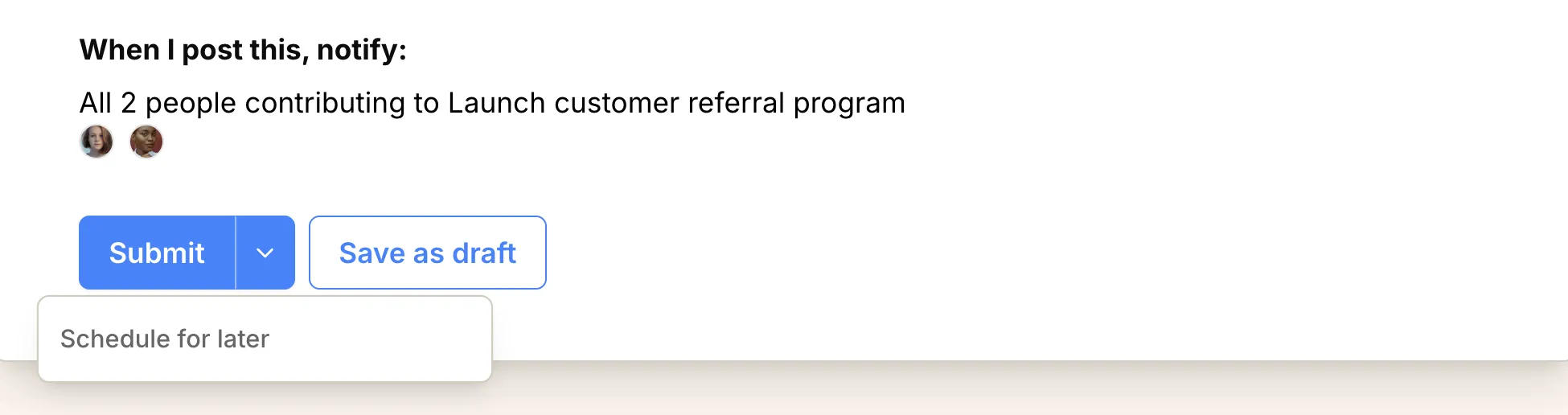
- Select a date and time.
- Click Confirm to save the check-in.
The scheduled time uses your configured timezone and must be in the future. Until it publishes, you can reopen the check-in to edit the content or change the publish date. You can also choose the options Publish now or Save as draft.
Save a draft#
If the check-in is not ready to publish, use Save as draft instead of submitting. Drafts are labeled Draft and only you can see them until you publish.
Each project can have only one draft check-in at a time. Save as draft creates it; every later save updates that same draft rather than starting a second one.
Reopen a draft from the Check-ins tab. On the draft page, use the … menu to Edit or Discard draft. While editing, click Save draft to save your changes or Submit check-in to publish.
Edit a published check-in#
With project edit access, you can fully edit only the latest published project check-in, and only during the first 72 hours after publication. Drafts and scheduled check-ins remain editable before they publish.
After the 72-hour window, you can still update the check-in description, but not its status.
Project status#
All newly created projects start with a ‘pending’ status. When submitting check-ins, you can choose from these status options:
On track — Progressing as planned. No blockers.
Caution — Emerging risks or delays. Reviewer should be aware.
Off track — Significant problems affecting success. Reviewer’s help is needed.
Reviewer acknowledgment#
After submitting a check-in, the reviewer must explicitly acknowledge it by clicking Acknowledge this Check-In. This ensures the reviewer has seen and acknowledged the update.
Additional check-ins#
While regular check-ins are encouraged, you can submit additional check-ins anytime significant progress is made or when urgent updates are needed.
After submitting a check-in#
- Status visibility: The project status will be updated and visible to all team members
- Team notifications: Selected contributors and the reviewer will be notified about the new check-in
- Progress tracking: Check-ins help maintain project momentum and transparency
- Historical record: All check-ins are preserved for future reference and project reviews